


Uber - Request a ride review
 Analysis by GetAllApps
I find ride-hailing apps most useful when they remove small uncertainties from a journey: where to request a car, how to coordinate a pickup, and what to do when plans shift. Uber is built around that everyday problem, with rides, taxi options and airport journeys available through one app. In my experience, its main strength is a familiar request-and-track flow; its main limitation is that a smooth screen cannot guarantee a smooth trip. Availability, pickup conditions and the suitability of a ride can vary by place and time.
From destination to pickup: the everyday workflow
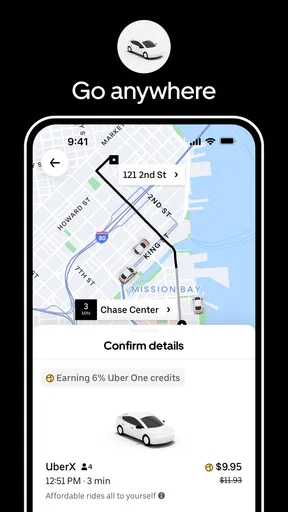
At its simplest, Uber asks where you want to go and presents ride choices for the trip. You choose an option, confirm a pickup point and request a driver. The app then helps you follow the journey through the stages that matter: locating the car, meeting it and keeping track of the ride. That clear sequence is why I would recommend it to someone who wants an alternative to hailing a cab or arranging a ride by phone.
The most useful habit is to check the pickup pin before you request. A map can place you near an entrance without identifying the entrance you actually need, especially around large buildings, busy streets or airport terminals. I take a moment to compare the pin with a recognisable meeting point, then move it if the app allows. That small pause can prevent the familiar problem of a driver and passenger waiting on opposite sides of a complex block.
For a normal local trip, the workflow is straightforward enough to use without much planning. For an airport run, I treat the pickup as a separate task rather than simply entering the airport as a destination. Airports often have designated areas and confusing road layouts, so I check the app’s instructions and the terminal information around me before walking to meet the car. A little attention at the curb is more valuable than repeatedly refreshing the screen.
The app is free to download and is developed by Uber Technologies, Inc. It sits in the maps and navigation space, though its purpose is more practical than a conventional map: it helps arrange a ride rather than primarily guiding you through a route on foot or by public transport. The overall experience feels aimed at getting a trip underway with minimal conversation, which is useful when you are carrying bags, travelling late or unfamiliar with the area.
Make the pickup work for the real world
One subtle but useful distinction is that the destination and the pickup point deserve equal attention. People tend to focus on where they are going, then request from wherever the map initially places them. I prefer to choose a spot where a car can safely stop and where I can identify it easily. On a crowded street, moving a short distance to a clear corner or entrance may make the handoff much less stressful, provided that location is appropriate for pickup.
If you are meeting someone else, agree on one precise point before either of you requests a ride. “Outside the station” may mean several doors, a taxi rank or a different side of the road. A shared landmark is more dependable. This is especially helpful when one person is navigating and the other is watching for the car; it avoids trying to solve two location problems at once.
Settings and choices worth checking before you need them
Ride options and app details can differ by location, so I would not assume that every choice appears everywhere. Before an important journey, open the app while you still have time to compare what is offered. For a short trip, the simplest suitable option may be enough; for a trip with luggage or several passengers, check that the displayed choice fits your actual needs rather than selecting the first result automatically.
I also recommend reviewing the account and app settings when you are not standing at a curb. Confirm that your usual payment and contact details are ready, and make sure you understand any preferences you have set. The point is not to spend time tweaking everything: it is to avoid discovering a preventable account or setup issue when you are already in a hurry. If you share a device or account, take extra care to check whose details and trip preferences are active.
For a first ride, read the trip screen rather than treating the request button as the whole process. Compare the pickup location and destination, look at the available ride choices, and check the information shown before confirming. If the route or pickup looks wrong, correct it before the driver is on the way. Fixing an address in advance is usually simpler than explaining a change after the car arrives.
The scale of the service is reflected in its 4.7 average rating, drawn from around 20 million ratings, and more than a billion installs. Those figures suggest that many people use it, but they do not tell me whether a car will be available on a particular street at a particular moment. I treat the app as a convenient way to request a ride, not as a promise that every trip will have the same wait, price or pickup experience.
Build a repeatable routine, not a rushed one
Experienced use is less about secret tricks than about repeating a few sensible checks. I set the destination first, inspect the pickup pin, compare the available ride types and confirm the trip details. If I am at a venue with multiple exits, I first identify the exit I can reach and then set the pickup accordingly. This order reduces backtracking and makes it easier to describe where I am if the meeting point is still unclear.
For a regular commute, save effort by learning the pickup spots that work reliably around your home or workplace, where the app’s tools and local conditions permit. A familiar, legal stopping point can be better than requesting from the most obvious doorway, particularly on a street where cars cannot pull over. Still, I recheck the map each time: construction, events or temporary road restrictions can make yesterday’s good meeting place a poor one today.
When plans change, avoid making several adjustments at once while walking through a crowd. Stop somewhere safe, confirm your current location and destination, then make the necessary change in the app. If another person is travelling with you, tell them what you changed. That simple sequence is useful because it keeps the map, the request and your real-world position aligned instead of turning a small change into a confusing pickup.
At night, I use the app’s trip information as one part of a broader routine. I check that I am entering the intended car and going to the intended destination, and I keep my attention on the journey rather than assuming that a moving map settles every safety question. Anyone who feels uncomfortable should trust that judgement and choose a safer alternative. App-based coordination can help organise a ride, but it cannot replace awareness of your surroundings.
Where the app can fall short
The central trade-off is that Uber is convenient when its local supply and pickup setup suit your journey, but less useful when either does not. A driver may be difficult to meet at a crowded venue, and a location pin can be awkward in a large complex. The screen gives structure, yet the last few metres still depend on clear landmarks, accessible roads and communication between passenger and driver.
It is also not a substitute for every kind of navigation. If I need to compare walking routes, understand a transit network or explore a neighbourhood on foot, a dedicated map or local transport app is usually the better tool. If I need a traditional taxi stand or a vehicle arranged through a local operator, that option may be more appropriate than waiting for an app-based match. The right choice depends on the trip, not on loyalty to one service.
Availability and the choices shown can change by area and time. That matters most when you have a hard arrival deadline. I would check the app early enough to decide whether the ride option is workable, then keep a backup plan such as public transport, a taxi rank or a lift from someone you know. For an ordinary flexible errand, that uncertainty may be a minor inconvenience; for a flight or appointment, it deserves more attention.
The app is free, but that does not mean every ride is free. The ride itself has a cost, and the amount presented can depend on the trip and the options available. I review the fare information shown before confirming and compare alternatives if the price does not suit me. This is a practical habit, not a reason to assume that the same route will always cost the same amount.
Its Everyone content rating makes the app broadly suitable from a content perspective, but younger passengers still need an appropriate travel arrangement and adult judgement. A rating does not determine whether a particular ride is suitable for a child, whether a pickup is safe or whether local rules allow a particular use. I would make those decisions based on the traveller, the journey and the options actually available.
Who will get the most from it?
I think Uber is a strong fit for people who take occasional city rides, visitors who want a familiar request flow, and travellers who appreciate having ride options gathered in one place. It can be particularly handy when carrying shopping or luggage makes walking and transit less convenient, or when you would rather arrange a car than search for a taxi on the street. The app’s broad reach is appealing, though the local experience remains what matters most.
It may be the wrong choice if you are trying to minimise every travel expense, if you prefer public transport, or if you need a guaranteed pickup at a precise time and cannot tolerate uncertainty. It may also frustrate people who dislike using a phone to coordinate a meeting point. In those situations, a scheduled arrangement with a local provider, a transit journey or a conventional taxi may offer a better fit.
Uber has been available since October 28, 2010, and the service has become a familiar name in app-based rides. I would not choose it solely because it is well known. I would choose it when the app shows a suitable ride, the pickup is practical and the displayed cost makes sense for the trip. That simple test keeps convenience in perspective.
My verdict: useful when you stay in control of the details
After using the app as a ride-request tool, my view is positive but measured. Its strength is a recognisable process that takes you from destination to pickup and lets you follow the trip. The best results come from habits that are easy to overlook: inspect the pin, use a clear meeting point, check the ride choice and read the fare before confirming. Those steps do more to improve the experience than tapping through the request as quickly as possible.
I would recommend Uber to a friend who wants a practical way to arrange everyday rides or airport journeys and is comfortable checking the details on a phone. I would also tell them to keep a backup for time-sensitive travel and to use a transit or map app when the question is how to get around rather than how to book a car. As a free app from a widely used service, it is easy to try; whether it is the right option for a particular ride still comes down to local availability, cost and the pickup situation.
Pros and cons
Pros
- Fare estimates appear before you confirm a ride.
- Pickup details can be shared with trusted contacts.
- Multiple ride options suit different budgets and group sizes.
- Cashless payment makes checkout straightforward.
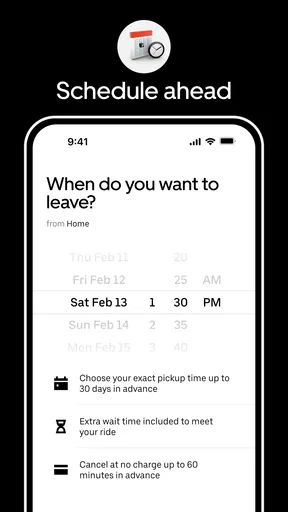
- Scheduled rides can help plan trips in advance.
Cons
- Prices can rise sharply during busy periods.
- Pickup times vary with traffic and driver availability.
- Some areas have limited ride options.
- Cancellation fees may apply after a short grace period.
- Service quality can vary between drivers.


